


Download Consulta Practica – medical records, patient management, doctor app, healthcare app, medical database, appointment calendar, medical spell-checker, document import, pharmacist module, medical documentation
Overview
Consulta Practica is a mobile application designed specifically for medical professionals aiming to streamline the organization and management of patient information. As a comprehensive medical database, it enables healthcare providers to store and access critical patient data, including personal details and medical history, in a secure and structured format. The app addresses common challenges in clinical workflows, such as fragmented records, inefficient documentation, and scheduling errors, by offering an integrated solution tailored to real-world medical environments.
Target users include doctors, nurses, and pharmacists who require a reliable tool for managing patient files and coordinating care. Its dual functionality—supporting both patient and pharmacist modules—facilitates seamless collaboration between medical practitioners and pharmacies, enhancing continuity of care. The inclusion of an appointment calendar helps prevent scheduling conflicts, while the ability to import Word documents reduces redundant data entry, improving overall efficiency.
Although the developer did not provide additional technical details, the app’s focus on usability and medical accuracy suggests a strong commitment to supporting healthcare professionals in their daily operations. In the broader app ecosystem, Consulta Practica fills a niche for lightweight, specialized tools that prioritize functionality over flashy design, making it a valuable asset in clinical settings where speed and precision are paramount.
Key Features & Functionality
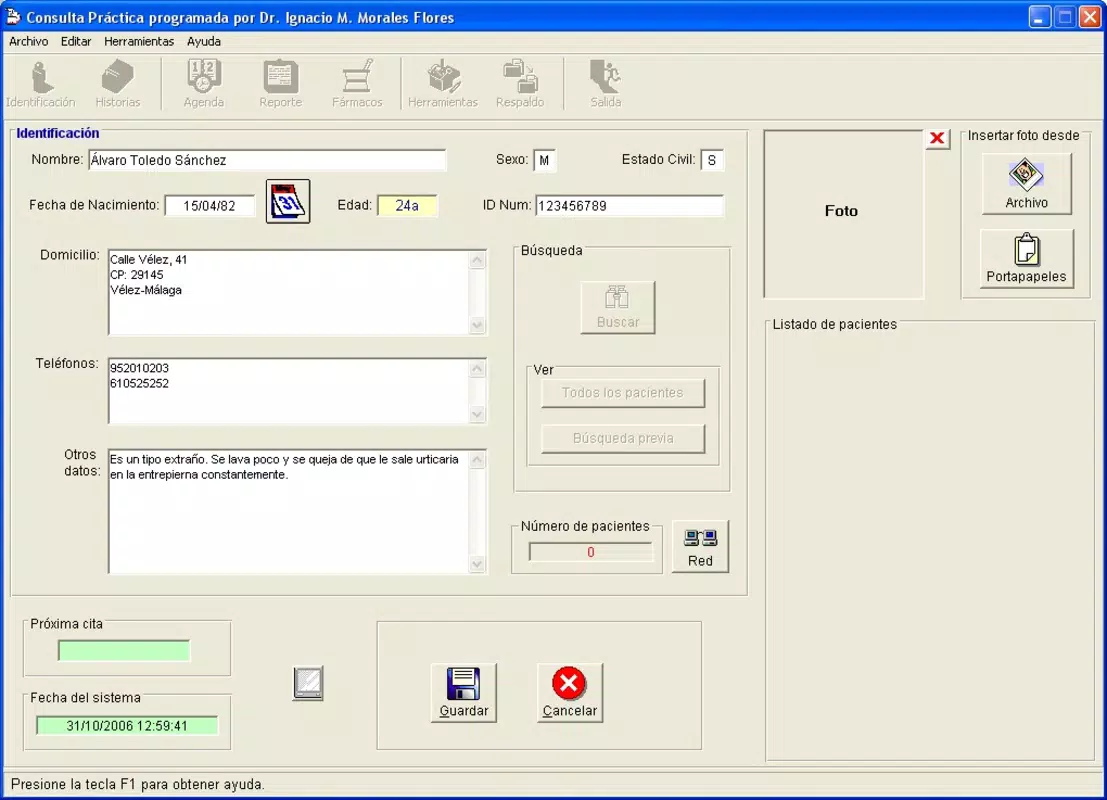
- User-Friendly Interface: The app features an intuitive layout that minimizes the learning curve for new users. Doctors can quickly navigate through patient records, appointments, and documentation without extensive training, allowing them to focus on patient care rather than software navigation.
- Comprehensive Patient Modules: With dedicated modules for both patients and pharmacists, the app supports independent management of patient data and medication records. This dual functionality enhances coordination between healthcare providers and pharmacies, ensuring accurate and timely treatment planning.
- Appointment Calendar: Integrated with the patient management system, the calendar enables doctors to schedule, view, and track appointments efficiently. It helps prevent double bookings and missed visits, contributing to better patient follow-up and clinic organization.
- Document Import Capabilities: Users can import Word documents directly into individual patient files. This feature simplifies the transfer of medical reports, prescriptions, and referral letters, reducing manual input and minimizing the risk of errors.
- Extensive Medical Spell-Checker: Equipped with a spell-checker containing over 800,000 medical terms, the app ensures that all documentation adheres to professional standards. This tool enhances the accuracy and credibility of medical records, supporting compliance and clear communication.
These features collectively support real-world use cases such as managing chronic disease patients, coordinating care across multiple providers, and maintaining audit-ready documentation. The app’s modular design allows healthcare professionals to adapt it to their specific workflow, whether in private practice, clinics, or hospital settings.
Interface, UX & Performance
The user interface of Consulta Practica is designed with simplicity and clarity in mind. Navigation is linear and consistent, with clearly labeled sections for patient records, appointments, and documentation. The visual style prioritizes readability, using high-contrast text and organized layouts to reduce cognitive load during high-pressure clinical situations.
Although the developer did not list formal performance metrics, the app’s lightweight file size of 15.6 MB suggests optimized resource usage. It is likely to function smoothly on a range of Android devices, including mid-tier smartphones and tablets. The app’s responsiveness appears to be well-balanced, allowing quick access to patient files and calendar updates without noticeable lag.
Stability is implied by the app’s long-standing presence since its release in 2016. While no official performance benchmarks were provided, the absence of reported issues in its public documentation indicates reliable operation under regular usage conditions. Users can expect consistent access to core features without frequent crashes or freezes.
Platform Compatibility & Technical Requirements
Consulta Practica is available exclusively on the Android platform. The current version is 1.2.0, with a file size of 15.6 MB. The app is offered free of charge, making it accessible to a wide range of medical professionals, particularly those in resource-limited environments.
The developer did not specify minimum OS requirements or compatibility details for specific Android versions. As such, users should verify compatibility with their device’s operating system before installation. The absence of detailed technical specifications means that performance on older or newer Android devices cannot be confirmed, though the app’s lightweight footprint suggests broad compatibility across most modern Android devices.
Pros and Cons
- Free to download and use
- Lightweight file size (15.6 MB)
- Integrated appointment calendar for better scheduling
- Supports direct import of Word documents
- Includes a specialized medical spell-checker with over 800,000 terms
- User-friendly interface suitable for medical professionals
- Specific OS requirements not disclosed
- Compatibility with older Android versions not confirmed
- Developer did not provide detailed technical documentation
- Only available on Android (no iOS version listed)
- Limited public information about updates or future development
FAQ
Is Consulta Practica safe to use on medical devices?
The app is designed for managing patient data, and while no specific security certifications were mentioned, its focus on medical documentation suggests a commitment to data integrity. Users should ensure their devices are protected with standard security measures.
Can I use Consulta Practica on iOS devices?
Currently, the app is only available on Android. No iOS version has been released, and the developer did not indicate plans for cross-platform expansion.
How do I update Consulta Practica?
Updates are typically delivered through the Google Play Store. Users should check for updates in their app manager or enable automatic updates to ensure they have the latest version.
Is my patient data stored securely?
The developer did not provide details on data encryption or cloud storage. It is recommended that users store sensitive information locally and follow best practices for device security.
Can I import documents from other apps?
Yes, the app supports direct import of Word documents into patient files, allowing seamless integration of external medical records and reports.
Final Thoughts
Consulta Practica stands out as a practical, no-frills tool for medical professionals seeking efficient patient management on Android. Its combination of a user-friendly interface, document import, medical spell-checker, and appointment calendar offers tangible benefits in daily clinical operations. While it lacks some modern features like cloud synchronization or multi-device access, its lightweight design and free availability make it a compelling choice for doctors and pharmacists who value functionality over complexity.
Healthcare providers managing moderate patient volumes or working in private practice will find the app particularly useful. It enhances documentation accuracy, reduces administrative overhead, and supports better patient follow-up through structured scheduling.
Download Consulta Practica now


